Group folders
Before you add someone to a group, you should know which access the person gets through it. That is why group management shows, below the member list, which folders the group reaches.
Viewing a group's folders
- In group management, open the group.
- Below the member list, click Folders (1). The number in brackets says how many folders there are.
- The Folder column lists these folders in alphabetical order.
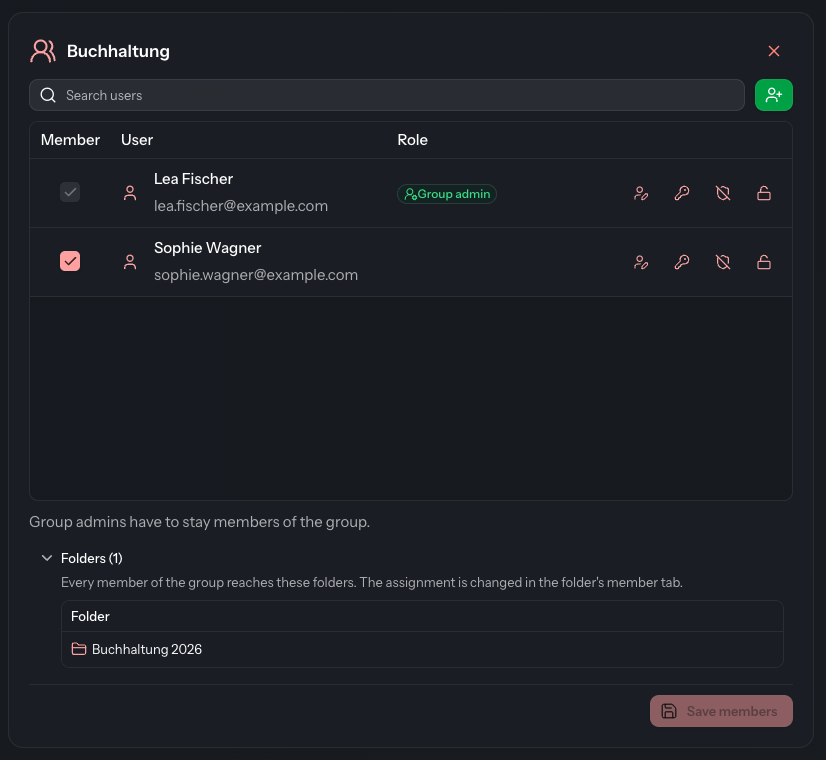
Every member of the group reaches all folders in this list. If the group reaches no folder, it says This group reaches no folder.
Where the assignment is changed
The list is for information only. You cannot add or remove a folder here. Which groups reach a folder is decided by an administrator in the Members tab of the folder, see Members.
Good to know
- Folder without own access (ID …) means: the group reaches this folder, but you yourself do not. That is why you see a number instead of the name.
- Clicking a row does not open the folder. In the File Explorer you find it through the folder list or the search.